Pushrod
Pushrod is a small, simple GUI library for Rust. It uses SDL2 for graphics and input, draws every widget itself into its own GPU texture, and composes each frame by copying those textures to the screen.

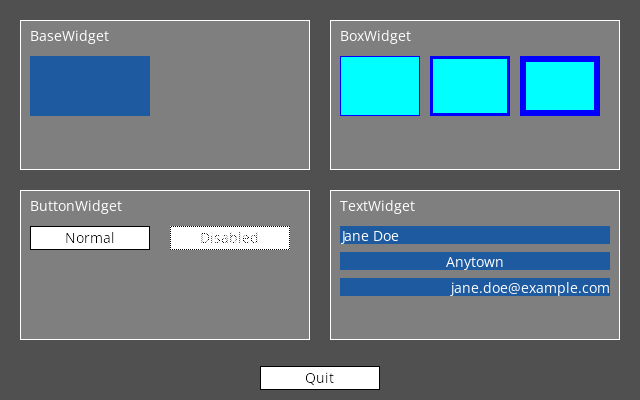
Every built-in widget, and its states, in the widget gallery (cargo run -p pushrod-sdl2 --example gallery):
What it's like to use
- Widgets live in a tree and are addressed by ID. Adding a widget returns a
WidgetId; callbacks and code refer to widgets by that ID, the way classic resource-file systems did. This is also what lets forms be designed visually and loaded from a file later. - Events are queued, then delivered to your code, in the style you prefer. Widgets react to the mouse and keyboard and queue events such as
Clicked. Pushrod then either calls the callbacks you registered (on_click,on_event) with mutable access to your application state and every widget, or hands the events to your own loop (while let Some(event) = engine.next_event(&mut events)). - Writing a widget is three functions. A widget stores a
WidgetCoreand implementscore,core_mut, andpaint; interactive widgets also implementhandle_event. - Simple by design. Widgets are flat: fills, one-pixel borders, and text. No glass, no bevels, no shadows, no rounded corners. See the design philosophy.
- Everything is drawn by Pushrod. No native menus, dialogs, or controls, so applications look and behave the same on every platform.
Where to go next
- Quick start: a working application in about five minutes.
- Creating an application: the engine, application state, and the widget tree.
- Handling events: how events flow and how callbacks work.
- Creating widgets: write and test your own widget.
- Widgets: every built-in widget, one page each. The gallery example shows them all in one window; run
cargo run -p pushrod-sdl2 --example gallery, or add-- --screenshot <file.png>to save a frame.
Pushrod is being modernized; see the roadmap for what's planned, and the widget roadmaps for how each planned widget will look and respond.